As the demand for Scenario Based courses increases, we are starting to find more effective and efficient techniques for using our current templates.
After completing my first scenario based course, I have found a few helpful shortcuts that make life a little easier.
When creating a normal course, filling in the lesson name and topic title automatically transfers to the "slide properties" on the articulate tab. When creating a scenario course, all of those text fields on the slides are not needed and therefore deleted, which then also carries onto slide properties (replaces the title with "Slide #"). This requires the designer to manually fill in the slide titles in the slide properties window.
To prevent this long and tedious step, instead of deleting those text fields, just move them up above the slide so they are not visible. This will allow the slide properties to continue to pull the title information, preventing the need for manual entry.
Another trick I have used is for text that appears to have been written on a white board or a notepad. The first thing I did was Google "handwriting fonts", and found one that I liked (I have posted this font on the content wiki). Our standard for animations in a regular course is to fade in/out, very fast. With a scenario course, there is much more leeway with animation options. For text written, I chose to wipe, from left, either fast, or very fast. This gives the appearance the text is being written onto the white board. There were a few instances I had arrows drawn on the whiteboard as well, and would use the wipe entry going in the direction of the arrow (down, up, left, right, and it works for diagonal too).
In addition to the above text trick, it is also important that each line of text have it's own text box, and the animation can either occur after previous, or on click. That way each line appears to write after the one before it, instead of all lines wiping from the left at the same time.
Another very important step is to create your cast of characters. Before you start building your people, make sure you read the transcript, and create a cast list. From there, create each character ahead of time so you can have them ready to insert into your course at the appropriate time. This will keep you consistent from the start.
The last tip I want to discuss today is using the background image. When I first began, I used the office backgrounds like another object on the slide, but I quickly realized that it is much easier to right click the slide to format the background fill, and select that picture from file. This will prevent any issues resizing, or having to constantly "send to back". You can also "Apply to all", preventing you from having to do that to each slide. You can customize certain slides as you go.
Despite the seemingly extra work that is required in a scenario based course, I prefer them over the conventional template. There is much more leeway, allowing the designer to be more creative, and use a variety of animations and tools to keep the audience engaged.
Friday, June 11, 2010

Thursday, June 10, 2010
The Quest for Perfection: A Hindrance or a Gift?
In the world of eLearning, a battle is brewing in the consciousness of a select few instructional designers—those who attempt to go the extra distance to ensure perfection but become obsessed with design flaws, consistency abnormalities, and technical glitches. No one is a bigger culprit in exhibiting these tendencies than yours truly. If you’re like me, you carry the perfectionist trait with you in your everyday life, outside of the eLearning, instructional design bubble. It’s simply an inherent attribute—often a shortcoming, a detour, an affliction, if you want to call it that.
Your colleagues and peers may label you a formalist, a fussbudget, a fusspot, an idealist, a nitpicker, a purist, a quibbler, or a stickler, to name a few. (Resource: Thesaurus.com) Perhaps the term “anal retentive” rings a bell; not really a world-class human brand identity. How little these folks know!
So, what is the real reason for our personal quest? It is our makeup; it is what we know; it is what we feel protects us from day to day. For us, seeking perfection is the compulsion to attain ultimate control over our environment, whether work oriented or personal. However, the sad reality is: the harder and faster we chase perfection, the more futile and unproductive it becomes. The thing is: we all want to achieve perfection; it’s knowing and identifying the appropriate time and place to strive for such a goal.
When it comes to our roles as instructional designers, we need to choose our battles carefully. Oftentimes, perfection in the workplace compromises critical deadlines and deliverables, as I have many times encountered, much to my chagrin. Being quality driven in this field is a highly constructive and valuable characteristic, but you have to remember the fine line between perfection in ensuring excellence and precision in the online learning experience and being a perfectionist, which can frequently lead to a myriad of headaches and a counterproductive work ethic.
Then, how can you prevent the hindrance of perfection? Well…it’s different for everyone. For me, it’s constantly reminding myself to keep the pace, move forward, and not dwell on and obsess over the miniscule details for hours on end. It’s forming an internal system of gradual behavior modification, and staying in check from one task to the next. Remember! The development process typically encompasses cyclical reviews by team associates, editorial and quality assurance staff, and stakeholders until final approval is received for official deployment. Fussing about only impedes progress and gets you nowhere.
And stress? Don’t get me started! Stress and panic are your worst enemies in this industry, or in any professional job for that matter. If it truly drives you to perform better, fine, you’re at the top of your game. But if it makes you sweat, forget it! It’s not worth it! Thinking you’re dictating outcomes by displaying frustration is positively exhausting. Take it from me! All we can do is be the best we can be by keeping a cool head and believing in our abilities as competent contributors to this field of online instructional design.
Don’t worry; you’re not the victim of some maniacal personality disorder. You are sane! I think! (Yes…this is your cue to laugh! Ha! Ha! Ha!) Have faith in yourself, take pride in your prowess, trust your quality instincts, and don’t doubt your integrity. Your intentions are there; you have a gift. Just stay focused, manage your time wisely, and follow through with commitments. A simple adaptation in behavior is the key to progress and meeting performance objectives. Efficiency, efficiency, efficiency!
And when all is said and done, stop and ask yourself this: is it the perfectionist in me, or is it me in the perfectionist? If you answer “yes” to the latter, you’ll know you’re being swallowed up and a change is in order. Don’t lose sight! Take the power back! Happy eLearning!
Wednesday, June 9, 2010
Where to Look for Inspiration

Sometimes creating courses can become rather monotonous. You may be restricted to the same templates and graphics - you're doing the same old stuff you've been doing. Other times you may just be plainly stumped as to how to best animate your content. So what do you do to break out of these ruts?
Well, there are a few different resources that I like to take advantage of when it comes to course development, including:
- Slide:ology: The Art and Science of Creating Presentation
- learningsolutionsmag.com
- articulate.com/blog/
- daveperso.mediaenglishonline.com/
- articulate.com/rapid-elearning/
www.learningsolutionsmag.com is also a great resource for inspiration. It's a publication from the eLearning Guild, as of 2002. It's a great source for "practical information on the strategies, tools, technologies, services, and best practices for the management, design, development, and implementation of enterprise-wide e-Learning programs. Learning Solutions Magazine offers feature articles, case studies, reviews, interviews, spotlights, columns, snippets, tips, and news that you can use with confidence while making critical decisions to ensure your organization’s success with e-Learning."
www.articulate.com/blog/ is a blog sponsored by Articulate. Authors of Articulate's blog share techniques, tools, and concepts that you can utilize when creating courses via a coupling of Articulate with MS PowerPoint. Many of the blog posts are even video tutorials, that show you step-by step just how to create some of these cool things.
daveperso.mediaenglishonline.com/ is a blog written and maintained by David Moxon, a Product Specialist for Articulate. His blog focuses on using Articulate products, like Articulate Presenter, Quizmaker and Engage. It is aimed to "provide extra support for doing basic, everyday tasks with Articulate software, perhaps giving a fresh angle on a common theme." You can find some really cool things on this blog, like creating a video hot spot question in Quizmaker, for example.
www.articulate.com/rapid-elearning/is another Articulate sponsored blog that shares Articulate related tips and tricks. Articulate's rapid-elearning blog is hosted by Tom Kuhlmann, a 15 year veteran of the training industry. Tom also presently run the community at Articulate.
So, the best part about all of these inspirational resources, with the exception of Slide:ology: The Art and Science of Creating Presentation, is that they are free! Just sign up to receive RSS Feeds or Emails from them. Just when you may be happening to need something new and fresh for you course, an email with just that newness and freshness from one of these resources may show up in your Inbox. So go and check them out before you start your next course - enjoy!
*References:
http://www.amazon.com/gp/product/0596522347?ie=UTF8&tag=slideology-20&linkCode=as2&camp=1789&creative=9325&creativeASIN=0596522347
http://www.learningsolutionsmag.com/
http://www.articulate.com/blog/
http://daveperso.mediaenglishonline.com/
http://www.articulate.com/rapid-elearning/
Friday, May 21, 2010
Consistently Designing
Instructional designers (IDs) are, by necessity, a creative breed. As a result, like many other folks of an artistic nature--we often have our idiosyncrasies. My personal curse is an obsession with consistency.
My background is in school district public relations, and the district I worked for was a leader in the field. One major factor of our success was very strict adherence to the department's style guide. Documents were checked and double-checked before publication and distribution, to ensure that they conformed to the guide; a veritable tome containing the carious rules and regulations that governed the creation of district communications.
Evidently, old habits really do die hard.
I've found it difficult, but critical, to accept that in the field of instructional design, it is often necessary to modify my stringency regarding consistency. Oh, don't get me wrong--the organization I work for has a style guide, and we do follow it. We use standardized templates for our courses; there are required formats for the various components that go into a course, and we use established color schemes and so on.
For me the challenge comes not so much from those mechanical issues, but from the fact that I'm creating material for a global audience, and no longer for a local one. The subject matter experts who write our courses come from all corners of the Earth--from Holland to England to the Middle East. As such, it is the practice of our organization to preserve the geographical flavor of each writer's background. This means that, one week, I'm spelling "organization" with an "s", and the next week with a "z". It means that one day "financials" is visually represented with a dollar sign, and the next day with the euro. In some cases we even mix these in a single course. Occasionally, regarding topics such as sustainability, I find myself touting the merits of a socialistic United Nations program; where the day before I was waving Old Glory for American industrial achievements and trusty capitalism.
Variety, though, is the spice of life. So, instead of choking myself on the cayenne pepper of inconsistency in my courses; I relish the saffron goodness that is the freedom I have to creatively help people learn to succeed in their chosen professions.
One idiosyncrasy down...10,000 to go...
Using Social Media to Enhance ELearning

Whoah?... We can use social media to enhance elearning?!
Yep. We can, and here's why:
- Social Media can create a more collaborative experience for students
- Social Media can help make content more engaging
- Social Media can allow your company to reap massive benefits
Most of us know how to facebook, myspace, tweet, and so on, but how do we use these social media outlets to make our online courses better? Let’s take a look at how we can use social media to be the best we can be.
Social Media can create a more collaborative experience for students
Social media can create a more collaborative experience for students because most students have varied expectations about elearning. Social media helps you engage students and develop better presentations.
Media use is on the rise and Multi-tasking has increased. Employees seem to push their work roles outside of the workplace by means of quick communications. Today's students want to take control of their learning and access information through convenient forms of media, such as their mobile. Social Media can help here by providing quick exchanges of information through various media formats.
Students also prefer different types of media interactions. So the more media interaction types you offer, the more ways you have of interacting with students before, during, and after they have taken a course.
You can use social media to allocate information, feedback, and networking in order to get the info and stats that you need, and when you need them. Social media outlets also offer tools such as polls and quizzes that can help you improve course content and delivery.
Social Media can make content more engaging
More robust and engaging content, that incorporates stories or examples, will increase student satisfaction, result in more constructive course feedback, and will potentially result in more recommendations for you company.
By creating an account, like twitter or facebook, and building it up, you can become a marketing powerhouse. These social media tools allow for real time information sharing and short updates that link students and companies to your company and its courseware.
In using sites like YouTube or Blogger, you can share information that can make your company more visible. For example, you can develop a series of videos or blogs that show teasers of courseware or what your company has to offer. Post them out there on the World Wide Web. Make sure to link them back to your site so that you can collect feedback and potential new students. If people like what they see in these posts, they may even share them with colleagues and friends through integrated social media channels.
Put an occasional tweet out there on your corporate account or share a snippet of new courseware with your facebook or myspace fans. Continued and open conversations keeps the info flowing and instigates responses from followers and students.
Social Media can allow your company to reap massive benefits
Social Media allows potential students to discover what past students have said about particular courses, to preview new courses, chat with present students, and network with current or potential students.
By utilizing social media sites that potential students frequent, you'll increase your audience, which in turn will increase the number of potential students or clients you can obtain.
Social Media offers opportunities for your company to promote its courseware. Use social media marketing by gaining followers, like on twitter. Then market to those followers with a specialized recruitment initiative.
Use social media for your own surveys, and to find new surveys by others. Social sites are a great place to ask questions in order to get new and better data related to your market. Additionally, followers of your social media accounts can have the ability to promote your surveys and share industry info with you. This constructive feedback helps foster the building of better content.
Social Media helps you stay attuned to trends, competitors, and market developments. So now, get out there and become a social media superstar!
Reference: 2010 Quantum Leap Marketing, Inc. GoToTraining_QLM_Social Media_in_Learning.pdf
Thursday, May 20, 2010
Selection and Visibility in PowerPoint
One of the more frustrating aspects of working with a large number of objects on a single PowerPoint slide is simply selecting and identifying them. If you have numerous objects and images stacked upon each other, chances are you have probably found yourself at some point clicking away and endlessly moving objects front/back in order to select the correct item. That’s where the PowerPoint selection and visibility pane comes into play.
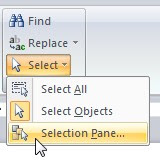
To open the Selection and Visibility pane click on the Home tab, under the Editing group, click Select, and Selection Pane.
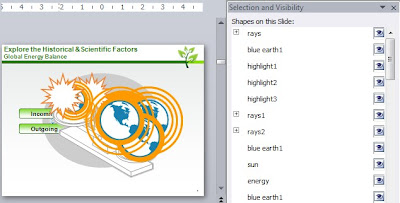
You’ll notice the PowerPoint layout now includes a pane containing an organized list of all the objects. You can click directly on the object name in the list and it will become selected on the slide. This is great for picking out an object buried beneath the pile and moving it around without the need bring anything forward, or move objects backward. You can also click the eye icon to the right of any item to disappear it from the slide altogether. This feature is also great for giving custom labels to items and groups for easier selection and identification.
To open the Selection and Visibility pane click on the Home tab, under the Editing group, click Select, and Selection Pane.


You’ll notice the PowerPoint layout now includes a pane containing an organized list of all the objects. You can click directly on the object name in the list and it will become selected on the slide. This is great for picking out an object buried beneath the pile and moving it around without the need bring anything forward, or move objects backward. You can also click the eye icon to the right of any item to disappear it from the slide altogether. This feature is also great for giving custom labels to items and groups for easier selection and identification.
Friday, May 7, 2010
Does Audio-Animation Syncing Got You Down?
Do you have crazy-sick hand-eye coordination that can be attributed to playing Mario Bros. for years? Can you click fast enough to properly sync every one of your animations correctly the first time around? If you have synced all your animations appropriately, except for 1 in the middle, are you okay with leaving it as is (hoping no one will notice it)?
If you have answered No to any of the preceding questions, maybe this syncing tip will help you! Sync your animations the best you can the first time around (or maybe even the second time around). Then go into Articulate Presenter’s Audio Editor, navigate to the slide that you are syncing, and click-drag the animation lines (the vertical lines that are topped with small circles) to the exact location where you want the animation to start while listening to the audio playback.

This manual dragging of the animation lines will inevitably make your syncing much more precise, and it will undoubtedly be a huge time saver. Happy Syncing to You All!
Subscribe to:
Posts (Atom)